Fix every inbox without
flattening your design.
Gmail drops CSS it doesn't support, dark mode flips your colours, and classic Outlook draws email with Microsoft Word. Most fixes please each inbox by making your email plainer. AI Fix is an agent that fixes each inbox with code only that inbox reads, re-checks every change in all 21, and won't hand you a fix that loses part of your design.
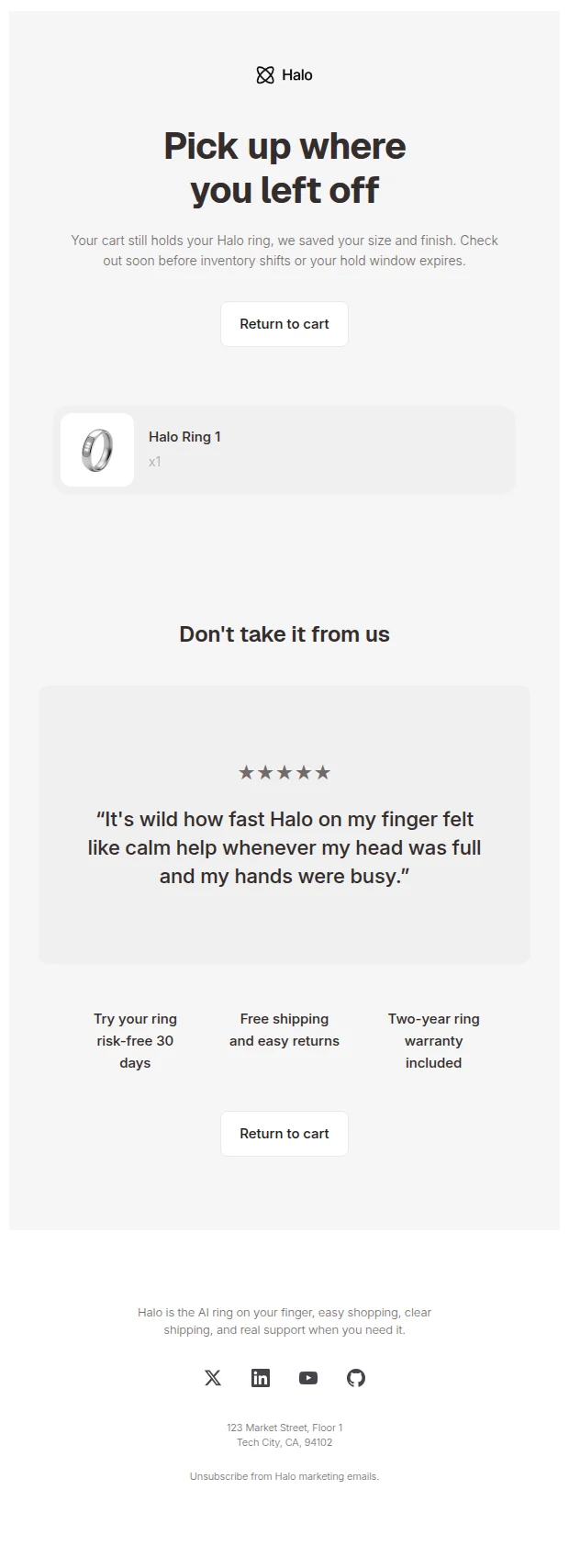
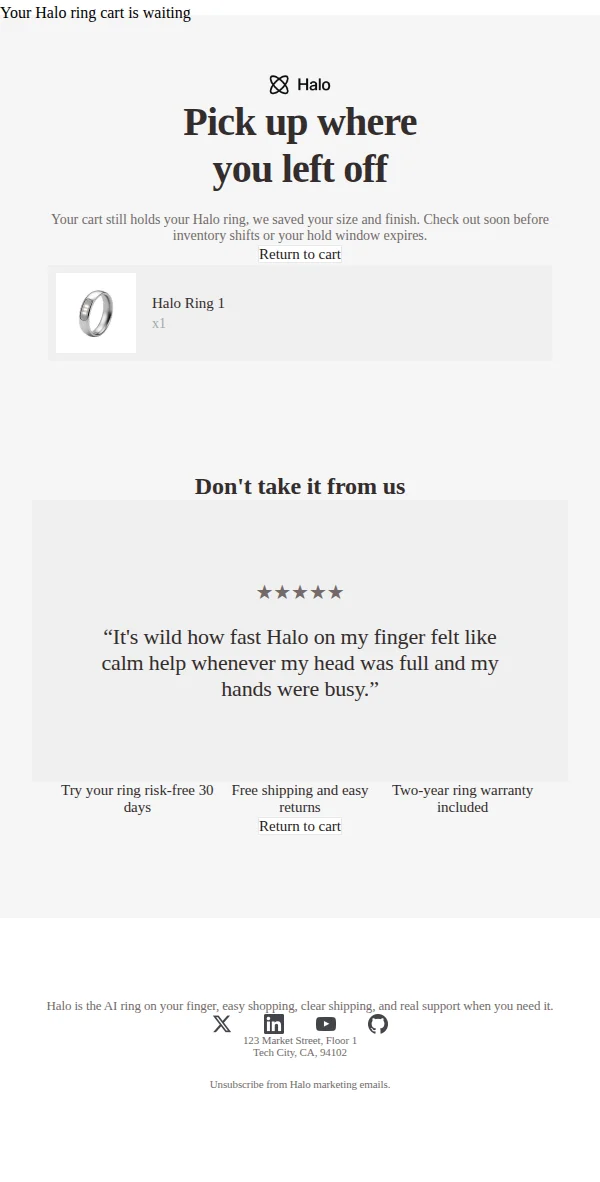
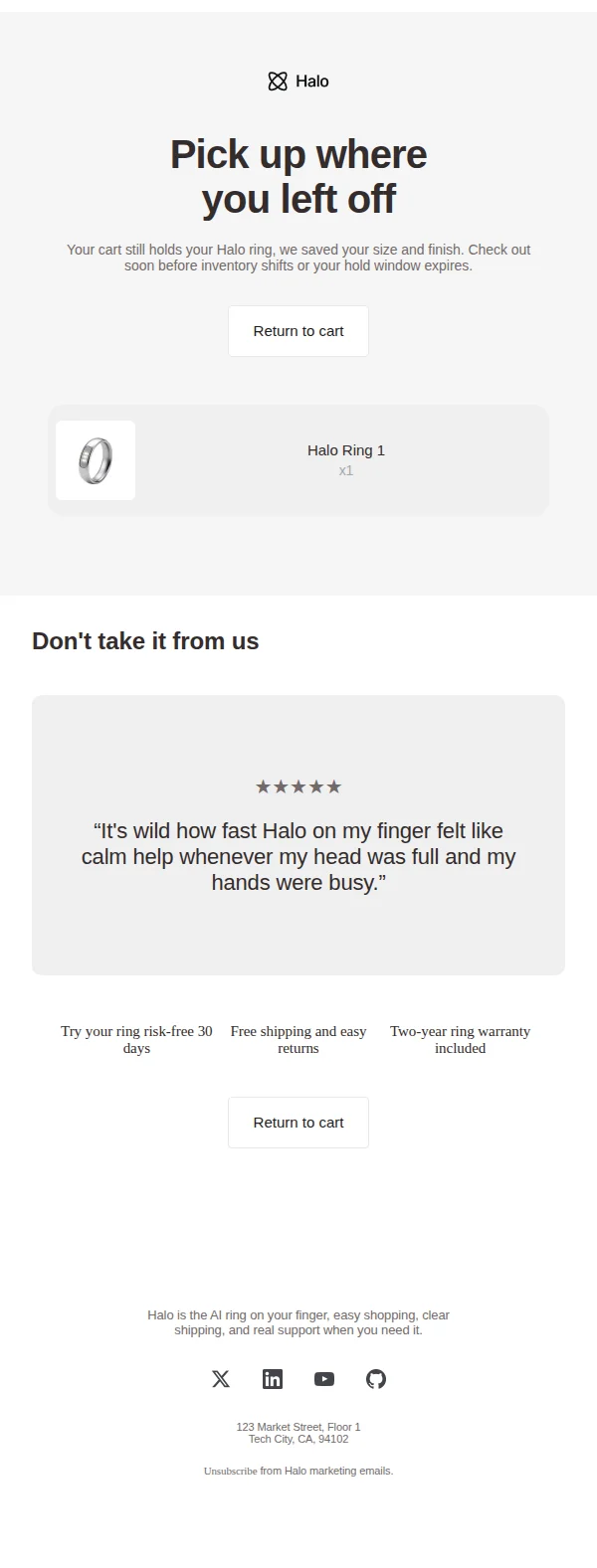
Classic Outlook is where an email breaks the most, so here is one: an abandoned-cart email in our Outlook Classic simulation, from a single AI Fix turn. Cards and buttons rebuilt, Arial instead of Times, spacing within 20px of the design, nothing from the design lost.
Most fixes trade your design for a better score.
Your reader doesn't see a score. They see the email, and whether it looks like the brand that sent it.
-
Rounded corners go square
Classic Outlook draws email with Microsoft Word, which ignores border-radius. The quick fix deletes the radius, so your cards and buttons go square in every inbox, not only in Outlook. Its fonts fall back to Times New Roman too: four of the five templates we sent to a real Outlook 2016 did.
-
Gmail collapses the layout
Gmail drops CSS it doesn't support, so a flex or grid layout falls into one long column there. The quick fix rewrites the layout plainer for every inbox instead of giving Gmail a table only it needs.
-
Design gets deleted to pass the check
A compatibility score rewards not using what a client drops, so deleting a feature scores like rebuilding it. In our benchmark of six AI coding models fixing emails with a linter, four cleared the corner warning by deleting the radius.
AI Fix brings the weaker inbox up to your design. It never takes your design down to the weaker inbox.
An agent, not a one-shot rewrite
It works the way you would: look, change, check, and look again, until the email matches your design or it tells you what's left.
- 1
Reads your design
Rounded corners, colours, borders, button shapes and fonts, read from your code before it changes anything. That list is the brief for every change.
- 2
Looks at the inbox
Screenshots of the client you're fixing, in light and dark mode, next to your design in the client that changes it least.
- 3
Fixes and re-checks
Every proposal is re-checked in all 21 clients, its width measured in a real browser. Each inbox gets code only it reads, like VML shapes and a 600px column for classic Outlook.
- 4
Holds back what fails
A proposal that loses part of your design or makes another inbox worse is sent back, never offered. Small differences come back as suggestions you tick.
Reading the design: 5 rounded features, 2 buttons, 2 web fonts
Screenshot: Outlook Classic, dark mode
Proposal 1, re-checked in 21 clients
Sent back: the 2 cards are still square in Outlook Classic
Proposal 2: cards rebuilt with corner cells, buttons in VML
Re-checked in 21 clients: nothing from the design lost
Suggestion: one gap is 20px short of the design, yours to tick
Ready to apply: Arial instead of Times, spacing within 20px
Checked on a real device, not just our simulation
We start where simulation is weakest: we send AI Fix's fixes to a real Outlook 2016 and compare them with the design. What the real client showed us is now a rule every fix follows.
- Text in a VML shape gets cut
- Outlook draws a VML text box at a fixed height, so a card wrapped in one loses whatever doesn't fit. Cards are rebuilt with corner cells, which grow with their text.
- A font rule written for * means Times
- The same rule written for td, p, a, span and div keeps your fallback font. Fixes write it that way.
- Word reads only the first class
- A heading styled by its second class loses its font in Outlook. Fixes put that class first.
- Corner cells need exact widths
- Leave one out and Outlook draws the corner partway along the card. Every cell of a corner row gets its width.
The same rules are in our open-source engine, so the MCP and the CLI follow them too.
Questions about AI Fix
What does an AI Fix cost?
Each message you send AI Fix counts as one. Every account gets three to try, Dev includes ten a month, and Pro includes AI Fix in the plan. A message whose fix is held back is given back.
Will it change how my email looks in other inboxes?
Only to bring them closer to your design. Code meant for one inbox goes where only that inbox reads it, like Outlook's conditional comments, and every proposal is re-checked in all 21 clients. One that makes another inbox worse is not offered.
Which inboxes can it fix?
Any of the 21 we check: Gmail, Outlook, Apple Mail, Yahoo and the rest, in light and dark mode. Classic Outlook for Windows takes the most work, because it lays email out with Microsoft Word.
Does it work with React Email, MJML and Maizzle?
Yes. A fix stays in the format you wrote: JSX for React Email, MJML, Maizzle or plain HTML.
Is my email sent to an AI model?
Yes, to Anthropic's Claude, only to write the fix. Content processed through it is never used to train foundation models.
Does it look at real devices?
When an email has a real-device screenshot, AI Fix treats it as ground truth over our simulation. Real-device checks are paused while we move to a new provider, so today it works from the simulation.
Fix the inbox. Keep the design.
Paste an email and see what breaks in 21 inboxes, free and without an account. Then let AI Fix rebuild it: three AI Fixes come with every free account.
Check your email, free