Yahoo Mail Ignores Your Font? Remove the Quotes
Yahoo Mail on the web drops an inline font-family whose list quotes a name, such as 'Courier New' or 'Segoe UI', so write the names without quotes (font-family: Courier New, Courier, monospace) or set the stack in a <style> class.
Works in all 21.
No signup · Five clients free, Outlook Classic included · All 21 with an account
The checker needs a computer screen.
A free account opens all 21 clients and keeps your checks for 7 days. Create a free account →
Philippe Kam, founder of Emailens · Published 28 Oct 2026
@emailens/engine 0.17.2 · data last changed 27 Oct 2026
Part of the HTML email guide · all guides
Your email looks right in Gmail and Apple Mail, but in Yahoo Mail the text is in a plain sans-serif font. If your font is set inline and one of its names is in quotes, that is the cause, and the fix is to delete the quotes.
The fix: write font names without quotes
Yahoo Mail on the web throws away an inline font-family when the list contains a quoted name. It drops the whole declaration, not just the quoted font, so the fallbacks after it are lost too:
<!-- Yahoo Mail drops this whole declaration -->
<td style="font-family:'Courier New',Courier,monospace;">
  npm install --save-dev emailens
</td>
Font names made of plain words do not need quotes in CSS. The same list without them is valid and Yahoo keeps it:
<!-- Same fonts, no quotes: Yahoo keeps it -->
<td style="font-family:Courier New,Courier,monospace;">
  npm install --save-dev emailens
</td>
Keep the quotes only for a name that needs them, one with a digit at the start or a character other than letters, digits, hyphens and spaces. If your font needs them, set it in a <style> class instead: Yahoo kept the quoted list there.
<style>
  .code { font-family: 'Courier New', Courier, monospace; }
</style>
<!-- A class keeps the font in Yahoo, quotes and all -->
<td class="code" style="font-family:Courier New,Courier,monospace;">
What we tested
We sent one test email to a real Gmail inbox and a real Yahoo Mail inbox, both opened on the web in Chrome, on 28 October. Each row sets the same text in a different way. In a monospace font, iiiii and WWWWW take the same width, so a lost font is easy to see.
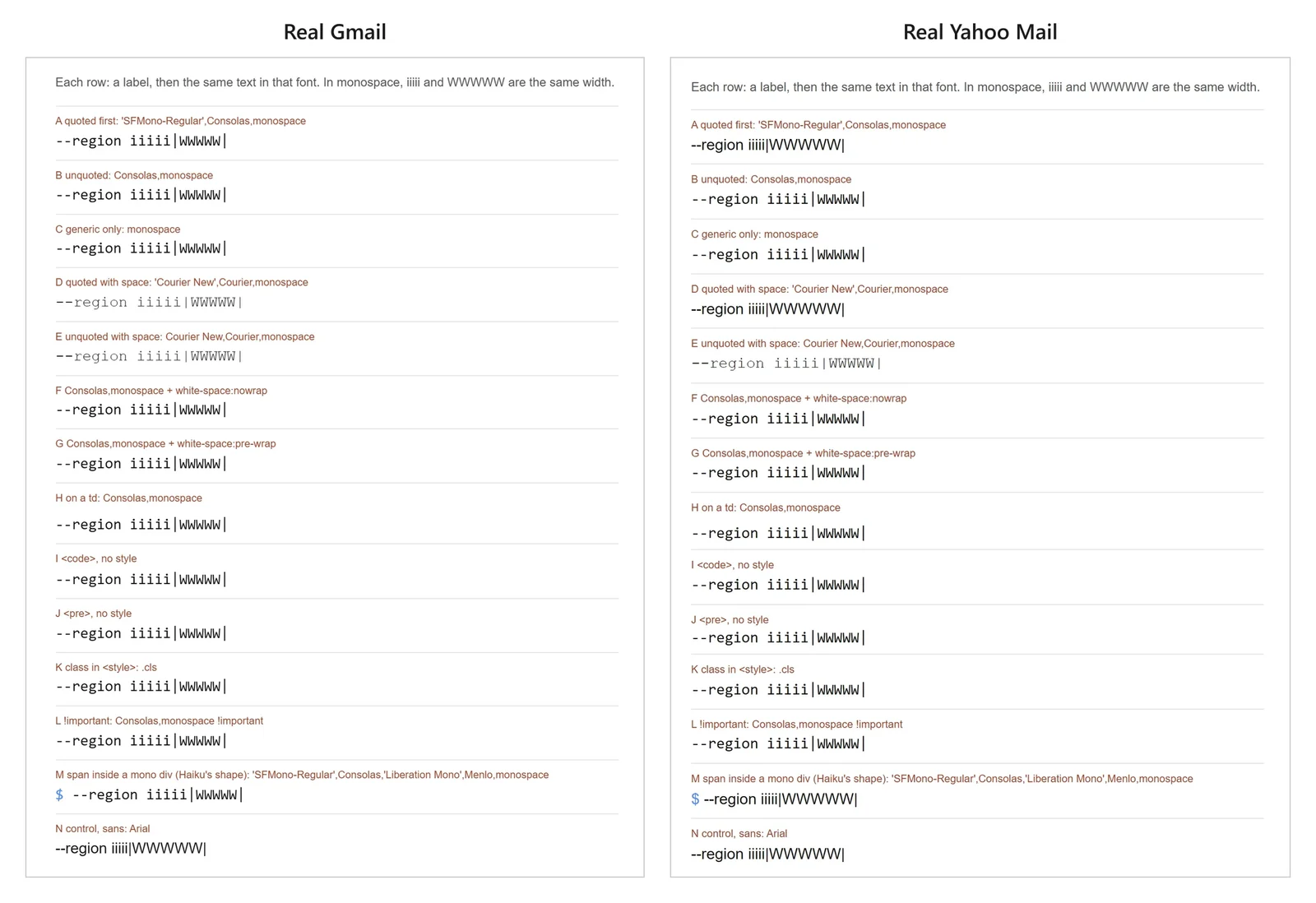
- Lost in Yahoo: any inline list with a quoted name, whether it came first (
'SFMono-Regular',Consolas) or later (Consolas,'Liberation Mono'). - Kept in Yahoo: the same fonts unquoted, the generic
monospacealone,!important, the font on a<td>,<code>and<pre>with no style, and a quoted list in a<style>class. - Gmail kept every row. Its web app does not load web fonts, so it used the fallbacks, as expected.
What it looks like in a real newsletter
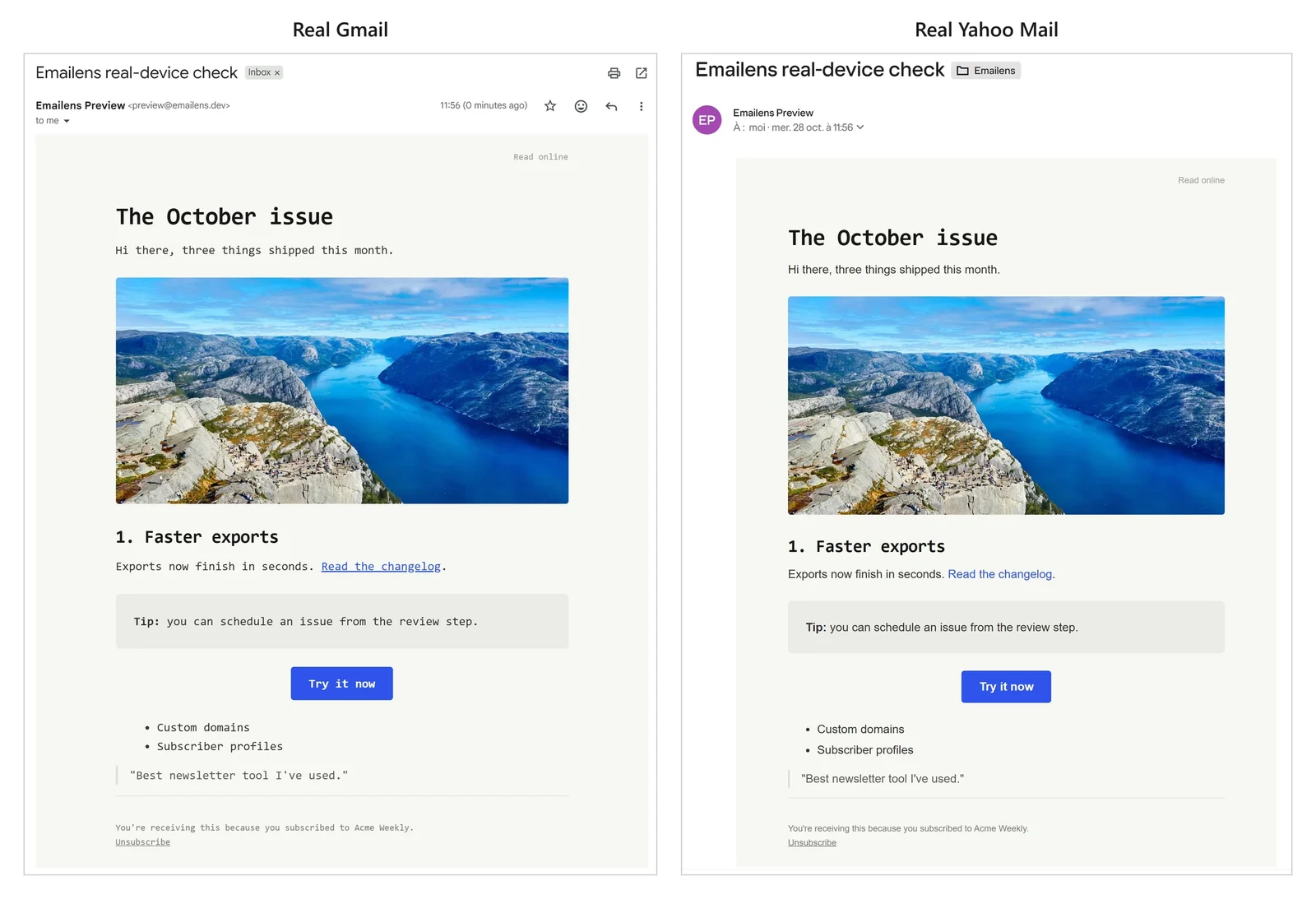
A monospace newsletter theme sets its font twice: in a <style> block for headings, and inline on the content table for everything else. Its inline list starts with the web font's quoted name. In Yahoo, the headings keep the theme; the body text, links, tip box, button, list and footer do not.
Common font stacks hit this without anyone choosing a special font: the system stack quotes 'Segoe UI', serif stacks quote 'Times New Roman'. Each works without quotes:
| Lost in Yahoo Mail | Kept |
|---|---|
| -apple-system,BlinkMacSystemFont,'Segoe UI',Roboto,Arial,sans-serif | -apple-system,BlinkMacSystemFont,Segoe UI,Roboto,Arial,sans-serif |
| Georgia,'Times New Roman',Times,serif | Georgia,Times New Roman,Times,serif |
| 'Helvetica Neue',Helvetica,Arial,sans-serif | Helvetica Neue,Helvetica,Arial,sans-serif |
| ui-monospace,SFMono-Regular,Menlo,Consolas,'Courier New',monospace | ui-monospace,SFMono-Regular,Menlo,Consolas,Courier New,monospace |
Your web font, if you load one with @font-face, still needs its fallbacks: Gmail and Outlook do not load it. See which email clients load web fonts.
Why support tables do not show it
Support data, ours included until this week, rates font-family as supported in Yahoo Mail, and the property itself is. What breaks is one way of writing its value, inline and with quotes, which a per-property table has no row for. We found it while testing emails that AI agents wrote for a newsletter app: the code blocks in a developer digest lost their monospace in Yahoo only.
Emailens now flags it. A quoted font list in an inline style raises a Yahoo Mail warning with the unquoted fix, and the Yahoo preview drops that font the way Yahoo does. Paste your email into the HTML email checker to see if yours has it.
Questions
Why does Yahoo Mail show my email in the wrong font?
If the font is set in an inline style and the list names a font in quotes, such as 'Courier New' or 'Segoe UI', Yahoo Mail on the web drops the whole font-family declaration. The text then uses Yahoo's own sans-serif font.
Are font names without quotes valid CSS?
Yes. A family name made of plain words can be written without quotes: font-family: Courier New, Courier, monospace is valid. Quotes are only needed for names that contain other characters or start with a digit.
Does this affect fonts set in a <style> block?
No. In our test, the same quoted font stack in a <style> class kept its font in Yahoo Mail. Only the inline style attribute lost it.
Do Gmail and Apple Mail have the same problem?
Gmail kept every form we tried, quoted or not. The issue was Yahoo Mail on the web. We have not yet tested the Yahoo Mail apps.
Your next question
Also useful: HTML email checker · CSS Support Lookup · Email Rendering Playground
Paste the email that broke.
No signup · Five clients free, Outlook Classic included · All 21 with an account
The checker needs a computer screen.
Get new email CSS fixes by email, or follow by RSS.