Your preview said fine.
Yahoo said otherwise.
A preview that gets a client wrong tells you a broken email is safe to send. So we check ours against real inboxes, fix every place they disagree, and ship each fix with the evidence.
- Gmail, Yahoo, Proton, Apple Mail and Outlook for Mac
- 60/60
- renders never misleading on Gmail, Yahoo, Proton, Apple Mail and Outlook for Mac
- Outlook Classic on Windows
- 7/7
- new emails never misleading in Outlook Classic on Windows, up from 4/10 on an earlier set
Graded blind by a person, on real emails our simulation had never seen. In plain terms: trust the preview for Gmail, Yahoo, Apple Mail and Outlook for Mac. Outlook on Windows is much closer now, but seven emails is a small sample, so check a real screenshot before a big send. The full score
Our own email failed this test
Our campaign button said "Run your free check". In real Outlook at 125% display scaling, common on Windows laptops, it said "Run your free". The card corners came apart too. Our own preview said it was fine.
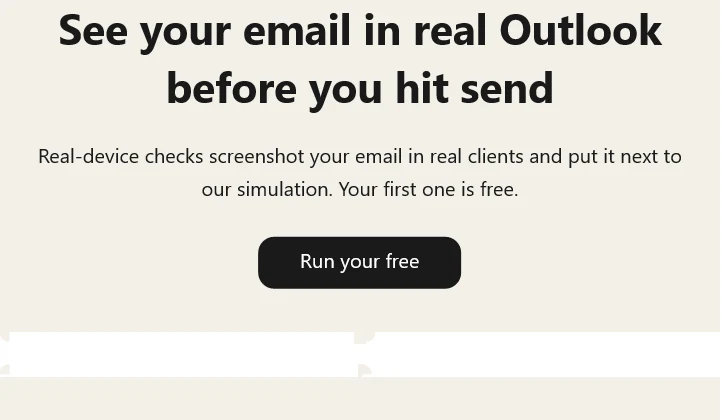
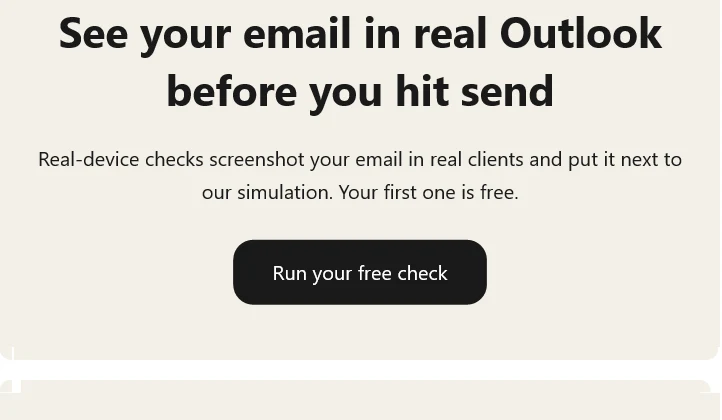
Outlook keeps VML shapes at their pixel size while text grows. One missing line was enough to cut a word off a button, and at 100% scaling nothing looks wrong, so a normal check never sees it.
<!--[if mso]><xml><o:OfficeDocumentSettings>
  <o:PixelsPerInch>96</o:PixelsPerInch>
</o:OfficeDocumentSettings></xml><![endif]-->
We fixed every template we send, read each one in real Outlook, and Emailens now warns you when your email has the same gap. Check yours.
Then we put the fixed email next to our simulation
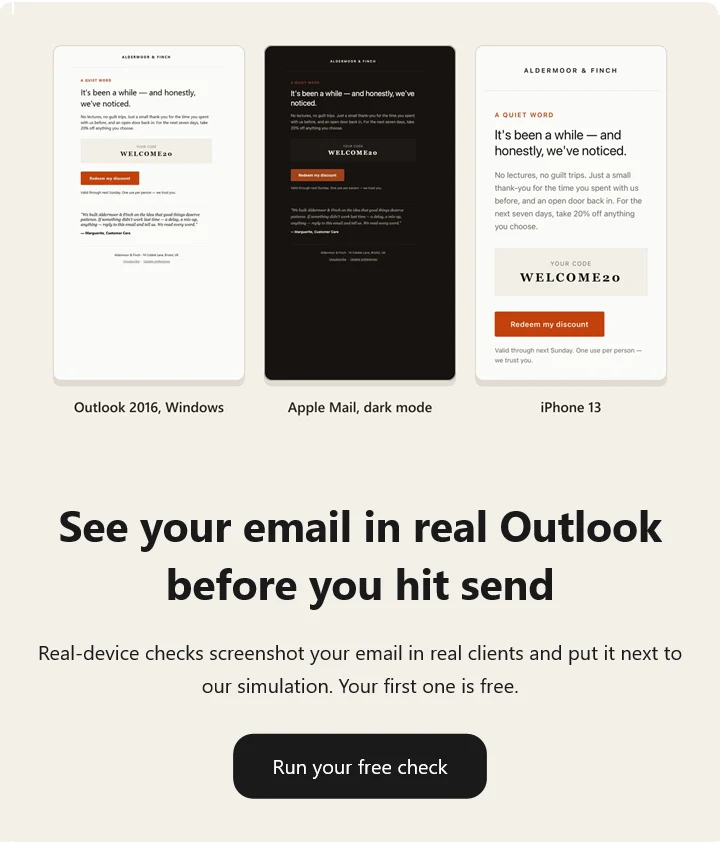
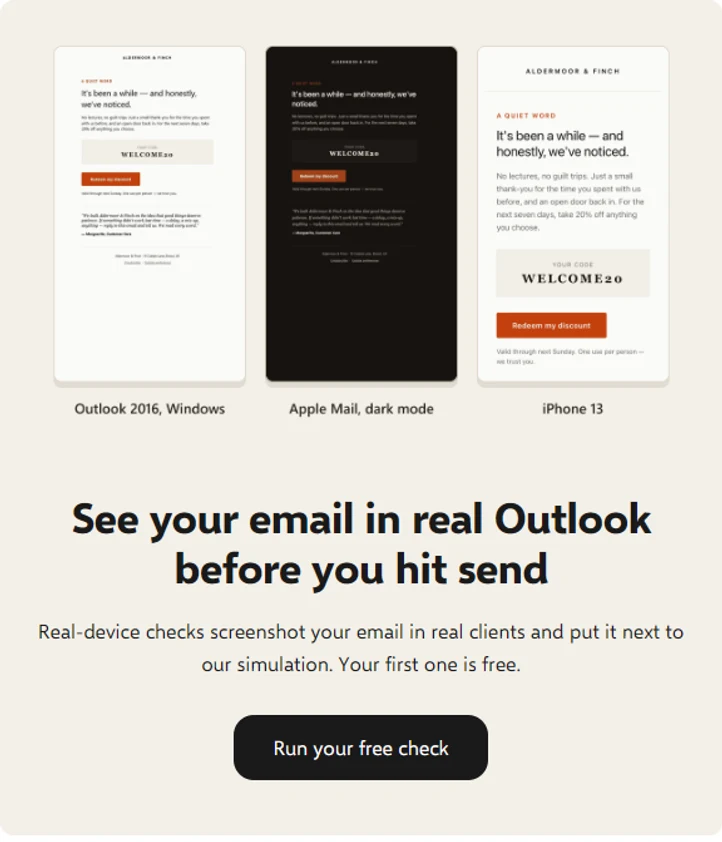
Same line breaks, same structure, seconds to run. The spacing is still a little off, which is why the score below counts small differences instead of hiding them.
The score, on emails it had never seen
We took 10 real marketing emails the simulation was never tuned on, sent each to real inboxes, and a person graded every real screenshot against our simulation, blind.
On the six clients that never misled, 39 of 60 renders were identical and the other 21 differed only in ways a reader would not mind. Outlook Classic missed on 6 of 10, so we rebuilt its layout model from measurements on today's build and graded 7 new emails the same way: none misled, 1 was identical and 6 had small differences.
| Client | SameIdentical | SmallSmall difference | WrongMisleading |
|---|---|---|---|
| Outlook for Mac | 9 | 1 | 0 |
| Apple Mail, Mac | 7 | 3 | 0 |
| Gmail web | 7 | 3 | 0 |
| Apple Mail, iPad | 6 | 4 | 0 |
| Yahoo web | 6 | 4 | 0 |
| Proton web | 4 | 6 | 0 |
| Outlook Classic, Windows | 2 | 2 | 6 |
| Outlook Classic, 7 new emails | 1 | 6 | 0 |
Measured 2026-10-31 on engine 0.18.4, light mode, one capture per client in wide desktop windows, graded by one person. Small differences were mostly line spacing and font weight. Each fix read off these emails makes them part of the tuning set, so the next score will come from a new set.
The 7 new Outlook Classic emails were measured 2026-11-02, chosen by us by sender rather than by a fixed rule, on one device, graded by one person, after five candidates we could not test fairly were left out. It shows the direction, not a percentage: the 95% interval runs from about 65% to 100%. Two grades were close calls: a button that came out broken in real Outlook but not in ours, and three footer logos we drew that real Outlook did not.
Real inboxes are the judge
Our simulation is a model of each client. A model is only as good as the last time someone checked it against the real thing.
- 1
Compare
Real emails go to real inboxes. Each screenshot sits next to our simulation of the same client.
- 2
Grade
A person grades every pair: match, minor or break. A model never grades our own work.
- 3
Probe
For each break, one small test email on the real client isolates the cause before anything changes.
- 4
Ship with proof
The fix lands with a test that pins what the real client did, and a warning for you where it can break your email.
What the loop has measured so far, separate from the blind score:
- real-client screenshots of our test emails
- 481
- real-client screenshots of our test emails
- real marketing emails replayed against the simulation
- 41
- real marketing emails replayed against the simulation
- Outlook Classic behaviours no support table lists
- 15
- Outlook Classic behaviours no support table lists
- small classic Outlook layout test cases that match the real app
- 177/179
- small classic Outlook layout test cases that match the real app
- support-table entries a real inbox proved wrong, now corrected
- 6
- support-table entries a real inbox proved wrong, now corrected
Yahoo threw away a whole stylesheet
A retailer's finance newsletter came out of Yahoo Mail at full width, with square cards, plain-text buttons and its desktop
hero missing. Before guessing, we sent Yahoo a probe: one <style>
block per suspect, each painting its row green if Yahoo kept it.
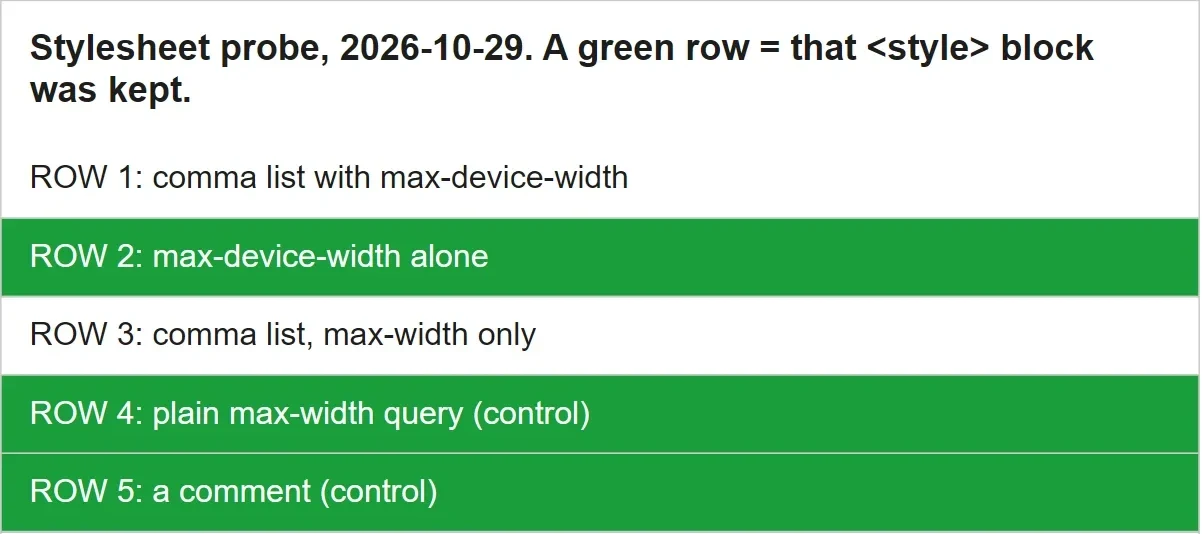
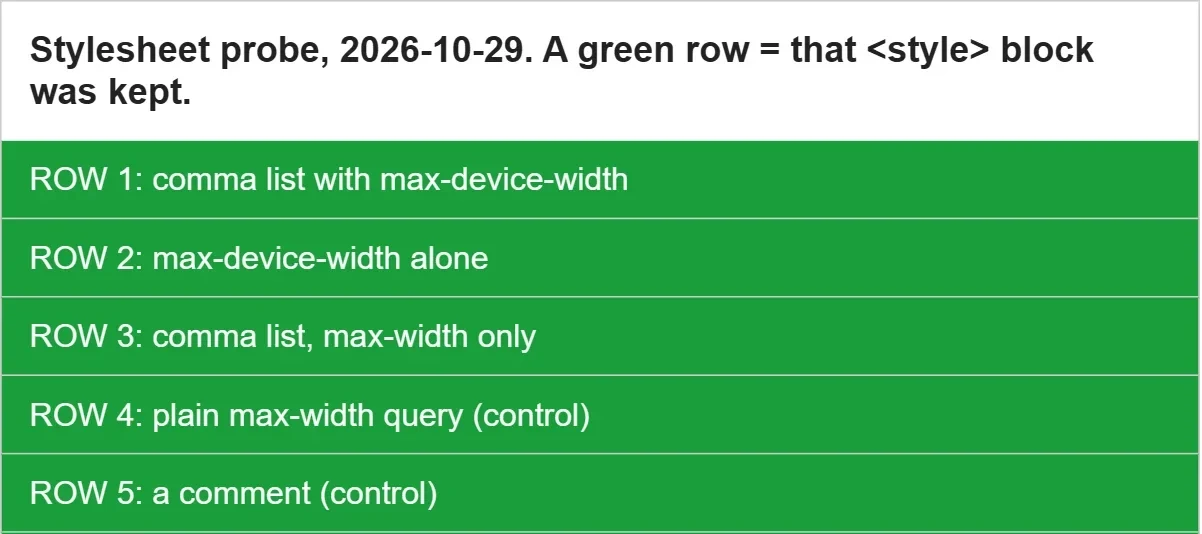
Yahoo drops the whole block when an @media query lists conditions with
commas, whatever the conditions. Gmail, Proton Mail, Apple Mail on Mac and iPad, Outlook for Mac and classic
Outlook kept every block.
/* Yahoo drops this whole <style> block */
@media screen and (max-device-width:600px), screen and (max-width:600px) { … }

/* Kept: one condition per @media rule */
@media screen and (max-width:600px) { … }
@media screen and (max-device-width:600px) { … }
If your template puts a comma in an @media query, your Yahoo and AOL
readers get the desktop layout on their phones, and every other preview says it looks fine.
Emailens now drops those blocks in its Yahoo and AOL previews and tells you how to split the query. Check yours.
Measured, not read off a spec
Documentation says what a client should do. A screenshot says what it does. When they disagree, the screenshot wins.
Rounded buttons in classic Outlook
The VML spec reads arcsize as a share of half the button's height. Real classic
Outlook drew a 48px button at 21% with a 10px corner, not 5px, so our preview now draws your buttons with the
corners Outlook really gives them.
How we measured it, pixel by pixel
| row | 1 | 2 | 3 | 4 | 5 | 6 | 7 | 8 |
|---|---|---|---|---|---|---|---|---|
| real Outlook | 9 | 5 | 4 | 2 | 2 | 1 | 1 | 0 |
| 10px corner | 7 | 5 | 3 | 2 | 2 | 1 | 1 | 0 |
| 5px, the spec | 3 | 1 | 1 | 0 | 0 | 0 | 0 | 0 |
The WebP that was a JPEG
Classic Outlook cannot draw WebP, so our preview blanked any image whose address ended in
.webp. Then real Outlook drew a newsletter's .webp images. The image server
picks the format from what the client asks for, and Outlook does not ask for WebP: it got a JPEG.
Now each preview asks the image server the way Outlook asks, and shows the image unless the answer really is WebP.
We wrote down Gmail's dark mode before we looked
Gmail on Android rewrites your colours in dark mode. We worked out its rule, committed 880 predicted colours first, then sent them to the real app. 878 landed within 4 of 255 per channel. It also caught what fitted curves missed: mid-tone text gets darker, so a green that passed contrast fails it.
What classic Outlook does on today's build
Older charts describe older Outlooks. We measured the current one, found 15 behaviours no support table lists, and built them into the simulation. A few of them:
- Unstyled text is Aptos, not Times.
- A list ignores padding-left and sits 48px in, whatever you set.
- An hr draws its margins plus 9px, in grey, and ignores its border.
- Paragraphs with the same border merge into one box.
- A bordered link keeps its padding, with its fill behind the text only.
- A unitless decimal line-height is ignored.
Where a real inbox overruled the support tables
The public support data says one thing, the real client did another. Each cell below is corrected in the engine, with the date it was seen. The list comes straight from the engine, so it grows with every release. Findings from an older set of test devices are left out until we check them again on today's.
-
2026-10-29 Yahoo Mail web (Chrome)
<form>The form is kept but its
actionis removed (absolute, relative and empty alike), and so isformactionon a button; Yahoo addstarget="_blank". The form cannot reach your server: link to a landing page instead.type="email"is also dropped from inputs;method, text, radio and submit inputs are kept. -
2026-10-28 Gmail web (Chrome)
flexThe
flexshorthand is dropped: an item atflex:0 0 34%lost its 34% and sized to its content.width:34%on the same item held, and so did a table. -
2026-10-28 Gmail web (Chrome)
flex-basisDropped, with flex-grow and flex-shrink beside it: the item sized to its content instead of 34%.
width:34%on the same item held. -
2026-10-27 Yahoo Mail web (Chrome)
flexThe
flexshorthand is dropped: an item atflex:0 0 34%shrank to its narrowest, breaking words letter by letter. Size flex items withwidth(andflex-shrink:0), or use a table. -
2026-10-27 Yahoo Mail web (Chrome)
flex-basisDropped, with flex-grow and flex-shrink beside it: the item sized to its content instead of 34%.
width:34%on the same item held. -
2026-10-27 new Outlook for Mac
grid-template-columnsPlain track sizes work (
300px 300px,1fr 1fr); a value withrepeat()orminmax()is dropped, so the grid falls back to one column.
Isn't a simulation just a guess?
A guess nobody checks, yes. Ours is checked against real inboxes, and it costs nothing to run, so you can test every draft in seconds and keep the real screenshots for the send that matters.
The score above comes from emails the simulation was never tuned on, because a score on the emails we tuned against would flatter us. It is dated, per client, and measured again on a new set as the engine changes.
Where it matters most, the real screenshot is still the final word. Every account gets one free real-device check while the month's free capacity lasts.
Every rule is open source
The client rules live in our MIT-licensed engine. Each change is in its changelog with what was measured, so you can check our work.
See what Yahoo does to your email.
Paste it in. We simulate every client and flag each break, with its fix.
Check your email, free